


- Event Promotion Tips
How to get involved with Black Friday and Cyber Monday on Skiddle
-
By Ryan Moss
- 27 Oct 2026
- 7 min read

This year, Black Friday and Cyber Monday (Friday 27th November to Monday 30th November) isn’t about cheap air fryers or robotic vacuums. No, sir. It’s all about making tickets to your events the impulse buy.
Both annual retail shopping events provide an opportunity to offer your fans a deal worth going out for, giving your sales a welcome boost in the run-up to the busy festive period.
With plenty of offers across the internet competing for attention, it’s going to be hard to cut through the noise. But if you use our exclusive discount code – blackfriday26 – and share it with your fans, you’ll get your events included in our Black Friday marketing campaign.
Keep reading to find details on how to get your discounts set up quickly and with ease, to see the benefits of getting involved and to learn about the work we do behind the scenes to promote your discounted events.
Setting up your Black Friday & Cyber Monday discount
Step 1:
Head to the Skiddle Promotion Centre and log in if you have an account. If you don’t, sign up HERE.
Step 2:
Create an event. If you already have one listed that you’d like to add the Black Friday discount to, go straight to step 3.
IMPORTANT: To have your event included in our Black Friday and Cyber Monday promotions, your event image should be either a JPEG or PNG, should be between 800px × 800px and 1024px × 1024px in dimensions, and should be no more than 10MB in size.
Text should take up less than 20% of your image and remain legible when displayed at a smaller size, such as on the Skiddle mobile app or within an advert. More listing advice here.
Step 3:
Head to ‘View All Events’ on the left-hand navigation menu and pick the event that you’d like to enable a discount code for.
Step 4:
Once you’ve chosen your event, you’ll be taken to the ‘Event Dashboard’. Click ‘Manage Tickets’ and then click ‘Discount Codes’.
Step 5:
From here, you’ll be able to set up a promotion, allowing you to create a discount code for your event.
Step 6:
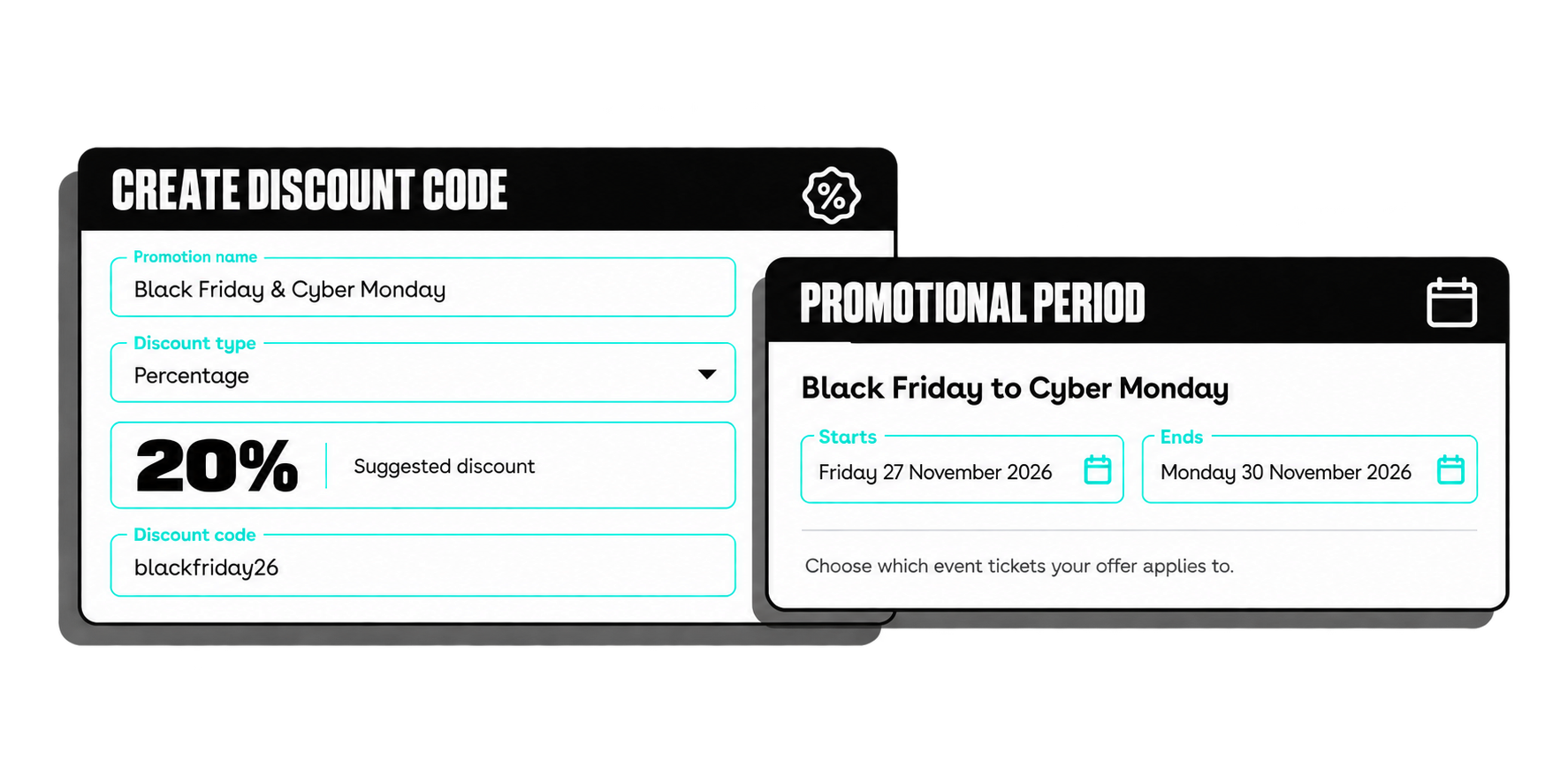
Select a name for your promotion and set the discount percentage.
We recommend a 20% discount, as data from previous years shows this is the promotion customers engage with most. Select the ticket you’d like the promotion to apply to, choose ‘multi-use’, generate one discount code and then paste ‘blackfriday26’ into the box at the bottom of the page.
Please note: codes entered in the Promotion Centre must be lowercase, but customers can enter them in either lowercase or uppercase at checkout.
Step 7:
Click ‘Save’. Congratulations, you’ve set up a Black Friday and Cyber Monday discount code!
Why you should get involved with Black Friday & Cyber Monday
Let’s start with the stats.
In 2025, a survey conducted by Barclays showed that 43% of UK adults planned to participate in Black Friday and Cyber Monday, with 52% of Gen Z Britons planning to shop during the sales. Given these results, you can’t really afford not to take a punt and run a discount.
Now put yourself in the shoes of your customers. Let’s say, for instance, one of your fans has been eyeing up an event of yours for weeks but has been hesitant to pull the trigger. All of a sudden, they spot you’re running a limited discount on your event and boom, a ticket is sold.
Offering discounts also does wonders for your events and/or your brand. Discounts create a positive experience for your customers, which in turn creates positive sentiment and loyalty. They help you to build a solid reputation among eventgoers and increase the likelihood of customers returning to buy from you again in the future.
The cherry on top? When you participate, you get the backing of our expert in-house marketing team, who know a thing or two about promoting events to our enormous and engaged customer base.
Get your events in our Black Friday marketing campaign
You’ve discounted your event, offering 20% off the original ticket price, by applying our exclusive discount code “BLACKFRIDAY26” in the Skiddle Promotion Centre. Nice one.
Here’s where you can expect to see your event being promoted:
- Our weekly Skiddle customer newsletter – sent to more than 500k+ subscribers
- Our Black Friday & Cyber Monday ‘Inspire Me’ page – featured on the Skiddle homepage, visited by 6.5 million monthly visitors, and on the Skiddle app, used by 3.6 million eventgoers
- Our social media promotions – followed by 300K+ users across Facebook, X, TikTok and Instagram
- Our customer blog – which receives on average 35K hits every month.
Discount Codes resources
We’ve covered how to apply the exclusive discount code to your events, shared the data behind the benefits of getting involved, and explained how we’ll be promoting your events through our marketing efforts. All that’s left to do is signpost some of our nifty help resources.
Should you need further assistance when creating your discounts, you can check out our tailor-made how-to video tutorial (see below) and read up on our insightful Discount Code FAQ guides.
Should you need anything else, you can chat with our chatbot or reach out to us via email at promoters@skiddle.com.
 Watch video
Tags
Got a question you need an answer to?
Give us a call on 03333010301 or ask us a question over on the Skiddle Promoter Twitter account by clicking or tapping on the button below. Alternatively, you can also find a list of our most frequently asked questions over at https://help.promotioncentre.co.uk
Latest articles
Read article
Key dates for ticket sales this festive season
-
By Ryan Moss
- 11 Nov 2026
- 9 min read
Read article
Skiddle and AIF back 20 festivals with membership and support
-
By Dale Grogan
- 10 Nov 2026
- 4 min read
Read article
Skiddle heads to Glasgow’s Resonate Music Conference 2026
-
By Dale Grogan
- 09 Nov 2026
- 5 min read
Read article
Autumn Budget 2026: What it means for those in events?
-
By Dale Grogan
- 29 Oct 2026
- 7 min read
Read article
Skiddle Report: Freshers Week 2026
-
By Dale Grogan
- 26 Oct 2026
- 6 min read
Read article
Welcome to Skiddle: Africa Oyé
-
By Dale Grogan
- 20 Oct 2026
- 3 min read
Read article
Come see us at The Showman’s Show and Un-Convention this October
-
By Dale Grogan
- 13 Oct 2026
- 7 min read
Read article
Welcome to Skiddle: Magna Science Adventure Centre
-
By Dale Grogan
- 08 Oct 2026
- 3 min read
Read article

Lancashire Music Association takes music-career support on the road
-
By Dale Grogan
- 07 Oct 2026
- 3 min read
Read article
How to promote Bonfire Night events and fireworks displays
-
By Dale Grogan
- 01 Oct 2026
- 12 min read
Accessibility settings
Accessibility profiles
Content
Navigation
Colour